What are automatic zooms for?
In an interface demo, viewers need to know where to look. An automatic zoom can move closer after an important click, make a small control readable and add pacing without manual keyframes.
How clicks become editable zooms
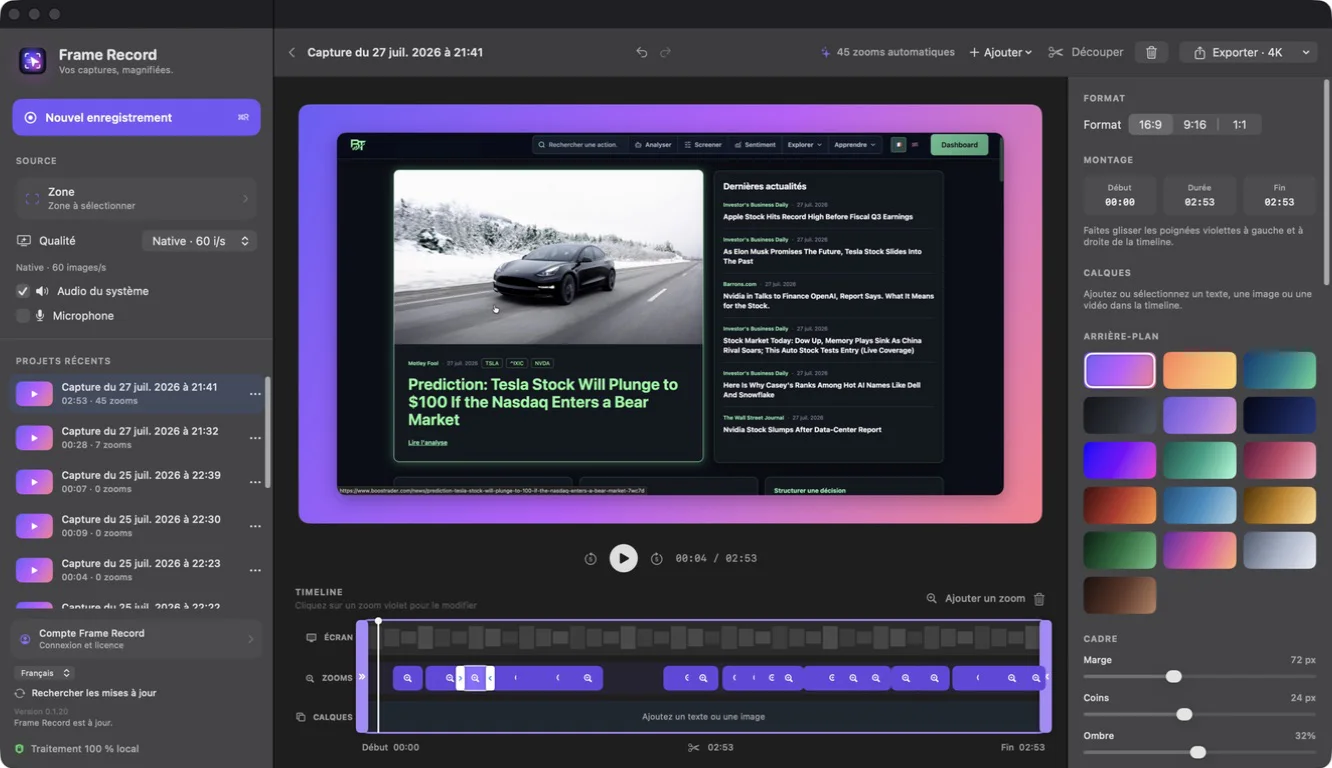
A purpose-built recorder stores interactions during capture and places zoom events on the timeline. You should retain control over position, duration, intensity and deletion. Non-destructive editing makes it possible to remove unnecessary events.
Avoid excessive automatic zooming
Zooming on every click creates constant motion. Group nearby interactions, leave visual rest between movements and favor actions that meaningfully change the interface.
- Zoom on confirmations, menus and results.
- Ignore unimportant navigation clicks.
- Give viewers time to read before moving again.
Fine-tune zooms on the timeline
Move a zoom to synchronize it with the action, shorten it for faster pacing and lower the scale when the interface is already readable. Real-time preview helps assess motion before export.
A practical Mac workflow
Frame Record detects clicks, creates an initial zoom sequence and lets you move, resize or delete each event. Automation removes repetitive work while keeping the final edit under your control.